Bi-fold A4 Size Flyer 3D Design Mockup Guide
When you need to present a printed marketing piece to a client or showcase a design concept, a flat digital file often falls short. A bi-fold A4 size flyer 3D design mockup bridges that gap by showing how your work will look in the real world. It transforms a simple layout into a lifelike preview, complete with shadows, reflections, and realistic folds. Whether you are a graphic designer, a small business owner, or a marketer, understanding how to use these mockups can elevate your presentations and help you communicate your ideas with clarity.
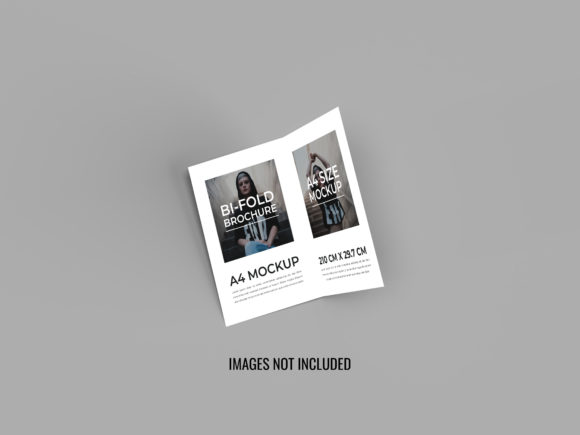
Think of a bi-fold A4 flyer as a printed sheet folded in half, giving you four panels to work with. It is a classic format for brochures, event programs, product guides, and promotional materials. The mockup takes that physical object and renders it in three dimensions, allowing you to see exactly how the flyer will appear when held, placed on a desk, or displayed in a brochure rack. Instead of imagining the final result, you get a preview that feels almost tangible.
What Makes a Bi-fold A4 Flyer Mockup Valuable?
The primary value of a bi-fold A4 size flyer 3D design mockup lies in its ability to show context. A flat PDF shows your design elements, but it does not convey scale, texture, or how light interacts with the paper. A 3D mockup simulates these qualities, giving clients and stakeholders a realistic impression of the finished piece. This reduces misunderstandings and speeds up the approval process.
For designers, mockups also serve as portfolio assets. A bi-fold flyer mockup displayed on a screen looks professional and polished. It signals that you understand not just digital design, but also the physical medium. For business owners, using a mockup before printing helps you evaluate layout choices, colour balance, and the overall visual hierarchy. You can experiment with different paper textures, finishes, or fold styles without spending money on test prints.
Another practical benefit is the ability to present multiple versions side by side. You can show a client two or three different designs in the same mockup environment, making it easier to compare and decide. This is especially useful when working with clients who have trouble visualising final results from flat layouts alone.
Who Benefits from Using These Mockups?
Almost anyone involved in creating or approving printed materials can benefit from a bi-fold A4 size flyer 3D design mockup. Freelancers and design agencies use them to present proofs to clients. Marketers and small business owners use them to evaluate campaign materials before sending them to print. Educators teaching graphic design or print production also rely on mockups to show students how principles like alignment, contrast, and white space translate to physical objects.
Even if you are a beginner, mockups are surprisingly easy to use. Many templates come as layered Photoshop or Sketch files where you simply drag and drop your design into a smart object layer. The mockup automatically applies the lighting and perspective. You do not need advanced 3D skills to create convincing presentations. Some online tools even let you upload your design and generate a mockup instantly without any software installation.
Realistic Use Cases and Examples
Imagine you are launching a new product line and need a bi-fold brochure to distribute at a trade show. Using a bi-fold A4 size flyer 3D design mockup, you can style the brochure alongside a business card or product sample to create a cohesive brand display. You can try different paper finishes like matte, gloss, or uncoated to see which best suits your product photography.
Consider a local restaurant updating its menu. A bi-fold A4 flyer mockup allows the owner to preview how the menu will look on a tabletop, with realistic lighting that mimics a dining environment. This helps decide whether the text is legible, images are appealing, and the overall design matches the restaurant's atmosphere.
For event planners, a bi-fold flyer mockup can showcase workshop schedules, speaker bios, and venue maps. Presenting the mockup to sponsors or partners gives them confidence in the professionalism of the event. The 3D element adds a layer of credibility that a flat file never achieves.
In educational settings, teachers can use mockups to explain the concept of folding and panel sequencing. Students learn how content flows from the front cover to the inside panels and back cover. A mockup makes these abstract concepts concrete.
How to Choose the Right Mockup Template
Not all bi-fold A4 size flyer 3D design mockup templates are created equal. When selecting one, consider the following factors:
- Perspective and angle: Some mockups show the flyer flat on a table, while others show it held in a hand or leaning against a surface. Choose an angle that fits your presentation context. A hand-held shot feels personal, while a desk shot feels professional and clean.
- Customisation options: Good templates allow you to change the background colour, adjust shadows, and modify the fold crease. Some even let you add your own background images or textures.
- Resolution and quality: Look for templates that offer high resolution, at least 300 dpi, so your mockup looks crisp in portfolio presentations or print proofs.
- Ease of use: If you are a beginner, choose templates that come with clear instructions or video tutorials. Smart object layers are the standard, but some templates use more complex layer structures.
- Paper texture and finish: A mockup that simulates paper grain, linen texture, or glossy coating adds realism. Consider whether your design benefits from a textured look or a smooth finish.
Important Considerations Before Using a Mockup
While a bi-fold A4 size flyer 3D design mockup is a powerful tool, there are a few things to keep in mind. First, mockups are meant to be convincing previews, not exact replicas. Colours may appear slightly different on screen compared to actual print, especially if your monitor is not calibrated. Always request a physical proof for final approval.
Second, avoid overusing the same mockup template. If every project in your portfolio uses the same angle and environment, your work may start to feel repetitive. Invest in a small collection of mockups that offer variety in lighting, background, and scale.
Third, respect licensing terms. Many free mockups come with restrictions, especially regarding commercial use or redistribution. Always check the license before using a mockup in client work or selling a design that incorporates the mockup. Premium templates often provide broader usage rights and better support.
Fourth, consider the emotional tone of your mockup. A dark, moody background suits a luxury brand, while a bright, minimal setting works for healthcare or education materials. The environment you choose should reinforce the message of the flyer itself.
Practical Tips for Creating Your Own Mockup
If you feel adventurous, you can create your own bi-fold A4 size flyer 3D design mockup from scratch using tools like Adobe Photoshop, Illustrator, or even free open-source software like GIMP. The basic process involves creating a 3D extrusion of a folded plane, applying your design as a texture map, and rendering the result with lighting and shadows.
For beginners, starting with a pre-made template is far more practical. Many online marketplaces offer high-quality templates for a small fee. Some websites even provide free mockups for personal projects, which is a great way to learn without financial commitment.
When placing your design into a mockup, pay attention to the resolution and alignment. Stretching a low-resolution image will make the mockup look unrealistic. Export your design at the exact dimensions recommended by the template creator. If the mockup includes a fold crease, make sure your design aligns with it, especially for the spine area where content may be hidden or distorted.
Why Mockups Matter for Marketing and Branding
In a crowded marketplace, presentation matters. A bi-fold A4 size flyer 3D design mockup helps your work stand out. When you share a design on social media, in a portfolio, or in a proposal, the 3D preview catches the eye. It suggests that you have thought about the physical reality of the product, not just the digital file. This attention to detail builds trust with clients and customers.
For small businesses, using a mockup can also streamline the decision-making process. You can test different headlines, images, and calls to action in a realistic setting before committing to print. This reduces waste and saves money. In an era where print budgets are often tight, knowing exactly what you are getting before you order makes a real difference.
Moreover, mockups are shareable. You can generate a PNG or JPEG of the mockup and include it in email campaigns, social media posts, or landing pages. Potential customers or investors can see your concept instantly, without downloading a special file or opening an editing program. That ease of sharing amplifies your reach and speeds up feedback loops.
Getting Started Today
If you have never used a bi-fold A4 size flyer 3D design mockup, the barrier to entry is very low. Start by searching online for free mockup templates from reputable sources. Download one that appeals to you, watch a short tutorial, and try inserting your own design. Even if you only have a simple layout, the mockup will make it look polished and professional.
Once you gain confidence, experiment with different backgrounds, lighting setups, and paper textures. You might even create a series of mockups for different seasons or campaigns. The more you use them, the more you will appreciate how a 3D preview changes the way you and others see your work. Whether you are a seasoned designer or someone just starting out, these mockups are a practical, affordable, and effective way to bring your flyer designs to life.